Icon
|
Command
|

|
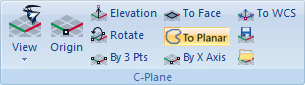
Immediately sets the orientation of the C-Plane to be parallel to the plane of the currently active view. The origin remains the same.
|

|
Moves the origin of the C-Plane to a selected point or entered coordinates. The current configuration of the construction plane is saved whenever the model is saved.
|

|
Moves the elevation of the C-Plane along its normal (perpendicular to the plane). Input is a single distance and may be positive or negative. A positive number moves the plane towards the positive end of the coordinate axes even if the viewing location is along the negative axis. All input values are treated as an incremental distance relative to the current location of the plane.
|

|
Rotates the C-Plane about one of the principle axes of the current C-Plane, X, Y, or Z. The center of rotation is the center of the plane and not necessarily the origin. Input is 'axis,degrees'.
|

|
Three points are selected (origin, x-axis and y-axis) or entered to re-orient the C-Plane. The y-axis point defines the C-Plane and the general direction of the positive y-axis.
|

|
The C-Plane will be oriented to a selected flat plane of a geometry object. The pick point will become the C-Plane origin.
|

|
Two points are entered to re-orient the x-axis of the C-Plane:
|

|
Resets the C-Plane back to its default orientation relative to the WCS and the currently active viewport. The origin will be the WCS origin.
|

|
This option saves the C-Plane orientation from the currently active view. A name must be provided for later reference when loading.
|

|
This option allows the retrieval of a saved C-Plane into the currently active view. A list of previously saved C-Planes is presented. These saved C-Planes may also be deleted in this option or renamed.
|