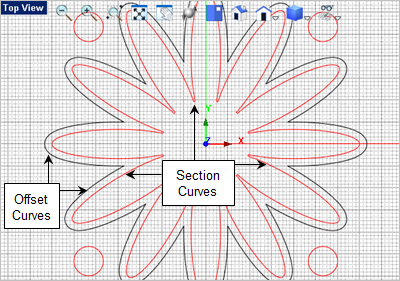
1.In the following steps you will create Offset curves from your Section Curves . Creating offset curves will also aid you during machining. For example, if you do not want to rough the entire stock, you can use section, offset or any other curve boundaries to limit/contain your toolpaths.
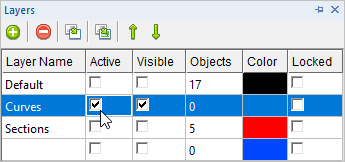
2.Open the Layer Manager  and set the Active Layer to Curves and then make all other layers hidden. Refer to the previous steps for displaying and using the Layer Manager. and set the Active Layer to Curves and then make all other layers hidden. Refer to the previous steps for displaying and using the Layer Manager.
3.Now, select the main section curve, then go to the Curve Modeling  tab and select the Offset tab and select the Offset  command. command.
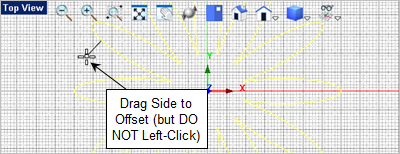
4.From the Top View  move the cursor towards the outside of the curve so that you see the offset direction indicator point toward the outside. DO NOT pick a point! move the cursor towards the outside of the curve so that you see the offset direction indicator point toward the outside. DO NOT pick a point!
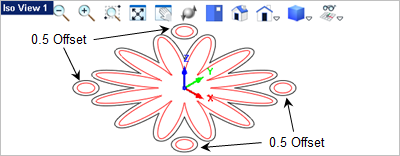
5.Now with the curve offset direction displayed enter 0.5 in the command input bar  and press the <Enter> key. The curve will be offset toward the outside by 0.5 inches. and press the <Enter> key. The curve will be offset toward the outside by 0.5 inches.
6.Press the <Enter> key to repeat the Offset command. This time select the section curves from one of the outer spheres, drag the cursor to indicate the offset direction and press <Enter> again. The offset value will default to the last value entered.
7.Repeat the command to create offset curves for the other 3 remaining section curves.
|