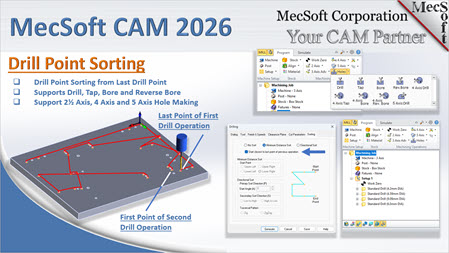
 In complex manufacturing, such as mold making or aerospace components, a single part can require hundreds of drilled holes. Traditionally, CAM software sorts these holes within a single operation—optimizing the path for that specific set of points. However, when a job requires multiple drilling operations (different hole sizes, depths, or tool changes), the transition between those operations often leads to unnecessary "air time" as the machine retracts and travels across the entire part to find the start of the next set.
Contents
The Limitation of Standard Sorting
The New Solution: "Start Closest to Last Point"
New Visual Aids: Start and End Markers
Why It Matters: Efficiency and Tool Wear
Introduction
In our recent webinar, MecSoft Corporation introduced a clever new solution to this problem: Cross-Operation Drill Sorting. Available in the 2026 release of VisualCAD/CAM, this feature eliminates wasted motion between drilling cycles.
The Limitation of Standard Sorting
Most CNC programmers are familiar with "intra-operational" sorting. Within a single drilling task, you can tell the software to sort holes by minimum distance or in a directional pattern (e.g., top-to-bottom or left-to-right).
The problem arises when Operation A ends at the far right of a mold plate, and Operation B (using a different tool) defaults to starting at the far left. The result is a long, unproductive rapid move across the workpiece.
The New Solution: "Start Closest to Last Point"
The 2026 update introduces a new checkbox in the Sorting tab: "Start closest to the last point of the previous operation".
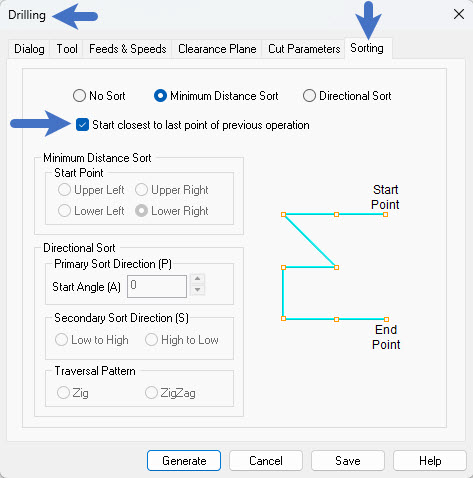
How it Works:
1.Analysis: When this box is checked, the software doesn't just look at the holes in the current operation. It looks back at the previous operation in the machining job tree.
2.Point Comparison: It identifies the exact "end point" where the previous tool finished its last hole.
3.Intelligent Entry: The software then selects the hole in the new operation that is physically closest to that last exit point and designates it as the new start point.
4.Local Optimization: Once the operation begins at that optimized entry point, your chosen sorting method (like minimum distance) takes over for the remainder of the holes in that set.
Visualizing the Workflow
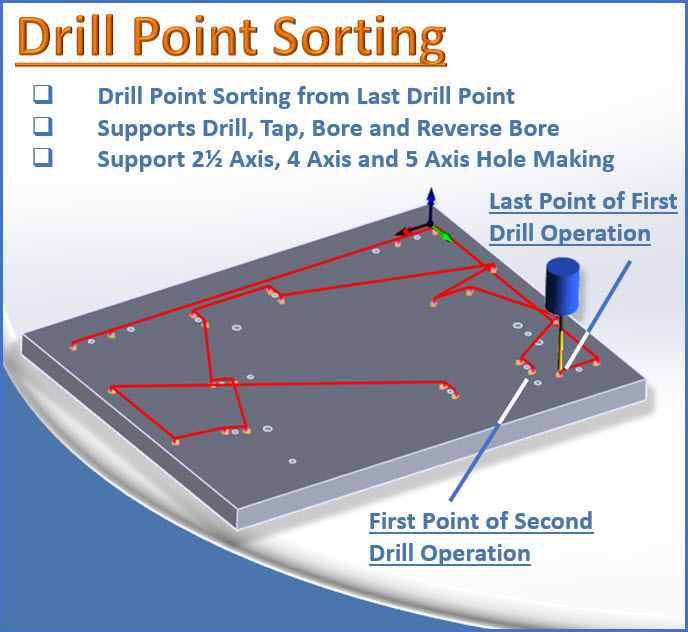
During the webinar, we demonstrated this using a part with multiple hole sets.
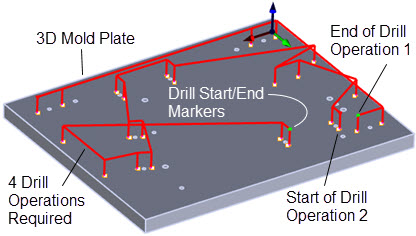
•Operation 1: Machined a series of holes along the outer edge, finishing at a specific "last cut point".
•Operation 2: By enabling the new sorting option, the tool for the second operation automatically bypassed its "default" starting position and moved directly to the hole closest to where the first tool left off.
New Visual Aids: Start and End Markers
To help programmers verify these paths, the 2026 version includes Toolpath Markers:
•Green Markers: Indicate the end point (last cut point) of an operation.
•Red Markers: Indicate the start point (first cut point) of an operation.
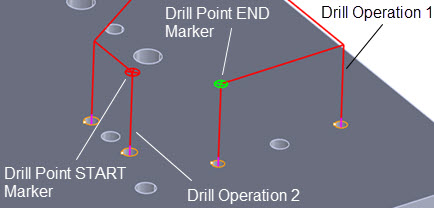
These markers provide immediate visual confirmation that your operations are linked efficiently, ensuring the red start point of Operation 2 is positioned right next to the green end point of Operation 1.
Why It Matters: Efficiency and Tool Wear
While saving a few seconds of air-travel might seem minor on a simple part, the benefits compound quickly in a production environment:
•Cycle Time Reduction: On parts with hundreds of holes and multiple tool changes (center drill, peck drill, ream), you can shave significant time off the total run.
•Reduced Machine Wear: Fewer long-distance rapid moves mean less wear on your machine’s ball screws and guide rails.
•Cleaner Transitions: The machine stays "in the zone," reducing the likelihood of the operator having to wait for long traverses.
Pro-Tip for 2026 Users:
When setting up a job with multiple drilling operations, always check the Sorting tab of your subsequent operations to ensure "Start closest to last point" is enabled. It’s the easiest way to ensure your machine is running at peak efficiency.
Conclusion
The new Drill Operation Sorting is a perfect example of MecSoft's commitment to "automation that makes your job easier." It's a "set it and forget it" feature that optimizes your machine's motion without requiring complex manual geometry selection.
Watch the full demonstration here:
https://youtu.be/WxKiKAv9a1U