Now that all your machine operations are generated and simulated, it’s time to generate some G-Code. In RhinoCAM (and VisualCADCAM) post-process occurs when you select an operation from the Machining Job tree, right-click and select Post. The File Save As dialog allows you to specify the file name and save your G-Code file. You can post one operation or several. You can also post the entire machine job into one G-Code file. The procedure is shown in the image below.
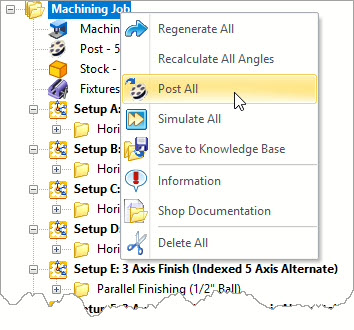
Select the Machining Job, right-click and select Post All. This generates one file that contains the G-Codes for all operations in the machining job.
In the resulting G-Code file, Setups A through J begin with a line of code with the rotation axis and rotation angle required to align the spindle in the required fixed orientation. These codes are then followed with the necessary G-Codes and coordinate values needed to instruct the spindle and cutting tool to cut each toolpath. You can see these codes in the excerpt of the G-Code file shown below.
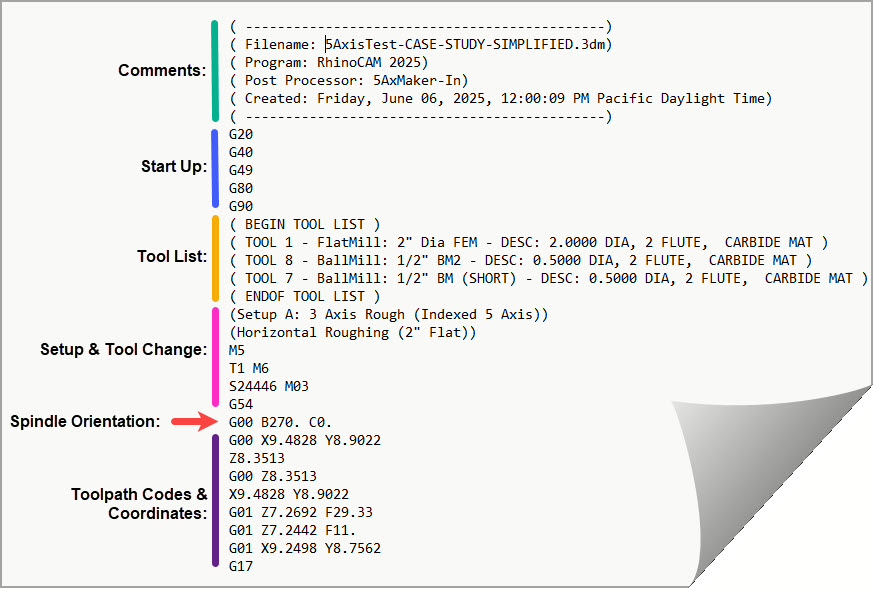
Here we see the beginning portion of the G-Code file posted from this 5 Axis Machining Job showing the Spindle Orientation codes, Setup and other toolpath codes required to run this project on the 5 Axis CNC machine.