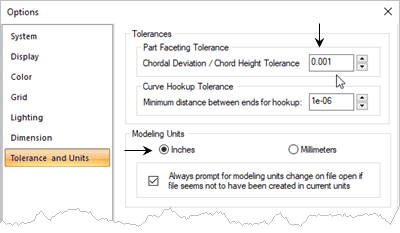
In this exercise you will learn how to set some of the systems options in VisualCAD. 1.Select the Home tab. 2.Now select the Options 3.Select Tolerance and Units from the left side of the dialog. 4.Under Part Faceting Tolerance set the Chordal Deviation / Chord Height Tolerance to 0.001". 5.Set the Units to Inches.
6.Select System from the left side of the dialog.
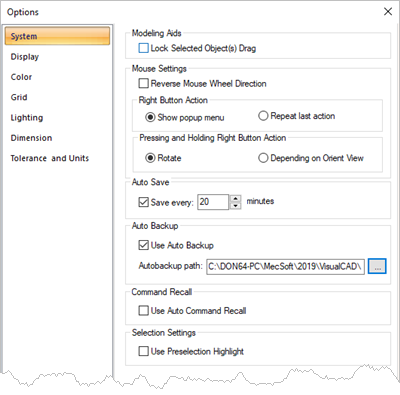
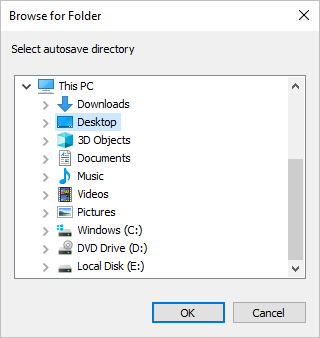
7.Under Auto Save, check the box and then set the value to save every 10 minutes. 8.Check the box to use Auto Backup and then select the ... box to display the Browse for Folder dialog. 9.Select the folder where you want backup files to be saved and then pick OK.
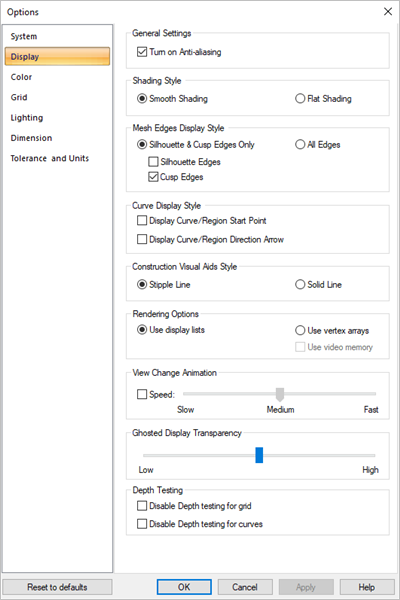
10.Set the remaining System Options as shown in the dialog above. 11.Now select Display from the left side of the dialog. 12.Under View Change Animation uncheck the box next to Speed.
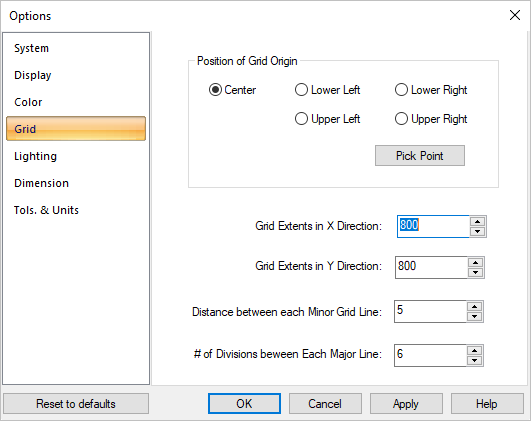
13.Set the remaining Display Options as shown in the dialog above. 14.Select Grid from the left side of the dialog. In these exercises we use the following Grid options.
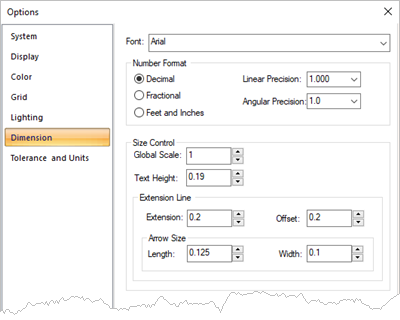
15.Select Dimension from the left side of the dialog. 16.Set the Dimension Preferences to those shown in the dialog below. 17.Pick OK to close the Options dialog.
|
 icon to display the