Note: This is a portion of a larger MecSoft Corporation written case study on the successful implementation of RhinoCAM at Piedmont Composites & Tooling located in Taylorsville, NC. You can read the full case study here.
Understanding Indexed 5 Axis Machining
Indexed 5 Axis machining (sometimes referred to as (3+2) machining),” indicates that the 5-axis spindle is locked in a preset orientation while 2 and 3-axis operations are performed. The CR-ONSRUD 5 Axis CNC machine at Piedmont Composites & Tooling has a 5 Axis Head-Head configuration. This means that the 4th primary Axis and the 5th secondary Axis are both located in the head of the machine where the spindle is located. For reference, the illustration below shows a 3, 4 and 5 axis spindle with each axis identified. The 5 Axis spindle on the far right shows a Head-Head configuration. For more understanding of how Indexed 5 Axis machining works we recommend our video on Indexed 5 Axis 3 plus 2 Machining here.
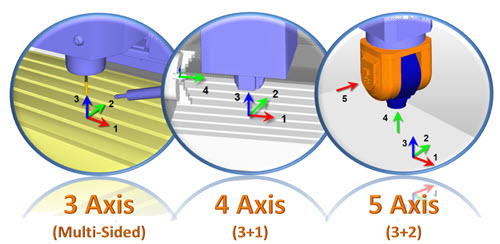
This illustration shows a 3, 4 and 5 axis spindle with each axis identified. The 5 Axis spindle on the far right shows a typical Head-Head configuration.
The RhinoCAM Part
The RhinoCAM part in this study is a Baptistery plug form measuring approximately 91” long x 54” wide x 36” tall. It is cut from EPS 2 lb density foam. The part requires indexed 5 Axis machining (sometimes referred to as (3+2) machining) to form the resulting cut model shown below. The resulting machined part will be used as a form (sometimes referred to as a “plug”) upon which fiberglass composite materials are deposited to form the Baptistery Basin. You can refer to the illustration below for the basic part shape and dimensions.
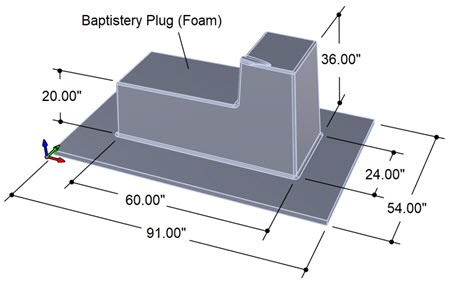
The RhinoCAM part is a plug form cut from EPS 2 lb density foam upon which fiberglass composite materials are deposited to form the Baptistery Basin.
Indexed 5 Axis Control Geometry
The control geometry for Indexed 5 Axis tool paths are identical to those of the 2½ Axis and 3 Axis operations being performed within each Setup. The control geometry for 2½ Axis operations can be curves and/or surface edges. The curves and surfaces can be planar or contoured and can be combined. Certain 2½ Axis operations require closed boundaries such as pockets while others such as Profiling and Engraving allow for open curves and surface edges.
The control geometry for 3 Axis operations consists of the visible part geometry and define stock geometry (for roughing operations) as well as curves and/or surface edges. 3 Axis operations do not require control geometry to be selected. In 3 Axis finishing operations, if no control geometry is selected the entire visible part is used. In 3 Axis roughing operations, if no control geometry is selected the entire visible part and the entire stock definition geometry is used. Also in 3 Axis, if curves and/or surface edges are selected, they serve to contain the toolpath and they must form a closed boundary area. The illustration below shows the control geometry used in this part.
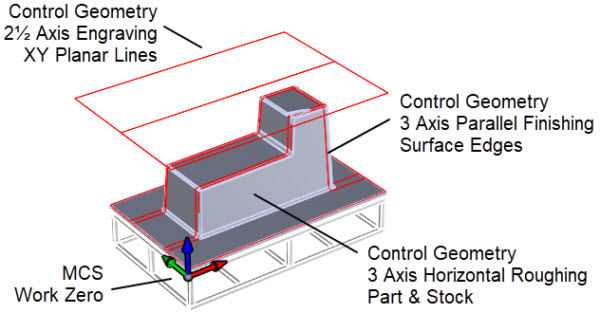
The Control Geometry for this part consists of XY planar curves for the 2½ Axis Engraving operations. For all 3 Axis Horizontal Roughing operations no control geometry is selected. For all 3 Axis Parallel Finishing operations closed surface edge perimeter curves are used.
Transfer Control in 5 Axis
The Machine Tool Setup dialog allows you to define the Radial Axis Angle Limits of the 4th Primary Axis and the 5th Secondary Axis on a 5 Axis CNC machine. Due to these limits the 5 axis spindle may have to unwind or rewind depending on the location on the last operation’s retract point and clearance plane and the next operation’s approach point and clearance plane. To assist in guiding the 5 axis spindle to the next area of the part to be machined, RhinoCAM provides the Engraving operation. During Engraving, the tip of the tool will follow exactly the control geometry selected. This allows you to physically map exactly where you want the cutting tool and 5 axis spindle to travel before it commences the next machining operation. The image below illustrates this.
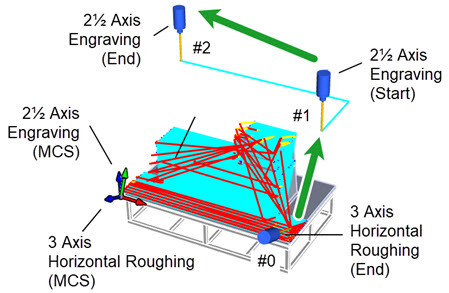
The 3 Axis Setup and Machining Job in VisualCADCAM
In the illustration above you see that when the 3 Axis Horizontal Roughing Operation is completed, the 5 axis spindle retracts and stops at the location marked #0. Because the very next operation is an Engraving operation, the tool immediately moves to location #1 and then traces the control geometry (in this case two connected XY planar lines) to location #2. You will notice that location #1 is near to #0 and that the tool will follow the control geometry to location #1 being on the opposite side near where the next machining operation is to begin.