The following Cut Levels tab allows you to define the location of the Cut Geometry in the Z axis as it relates to the part of the stock models

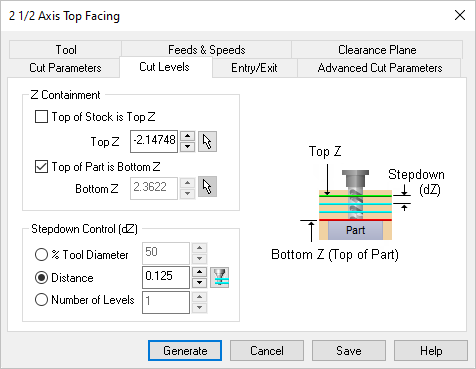 Dialog Box: Cut Levels tab, MILL Operations |
Top of Stock is Top Z For Z Containment select this option to align the top of the cut to the highest point of Stock in the Z axis. Top (Z) For Z Containment specify the maximum Z position for the start of the cut. This is referred to as Top (Z) in the illustration. You can enter the Z value directly or use the Pick 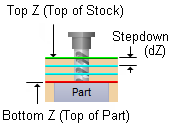 Z Containment Top of Part is Bottom Z For Z Containment select this option to align the bottom of the cut to the highest point of the Part in the Z axis. Bottom (Z) For Z Containment specify the minimum Z position for the end of the cut. This is referred to as Bottom (Z) in the illustration. You can enter the Z value directly or use the Pick Z Containment |

This section allows you to define the spacing between the horizontal cut levels for the roughing operation. The spacing can be specified either % Tool Diameter, a specific Distance or as the total Number of Levels desired.
|
 Select this icon to assign the