 You can specify certain post-processor options and rules for post processing. This is done by selecting "Set Post Options" from the Program tab under the Machining Browser.
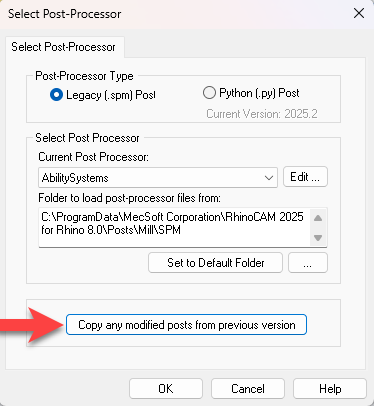
This will bring up the following dialog.

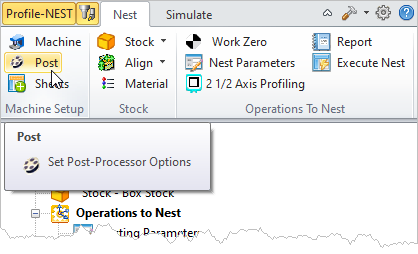 Post menu selection, Nest tab, Machining Browser |
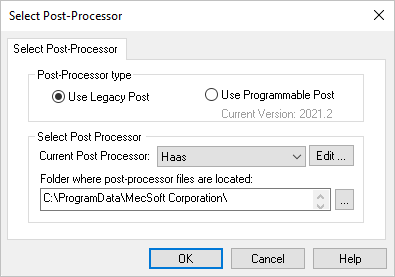 Dialog Box: Set Post-Processor Options |
Use these options to define the post type to use when posting toolpath operations. Each option is documented further in the Post-processor Generator On-Line Help. Legacy (.spm) Post Select this option to use your "Legacy Post" when posting toolpath operations. "Legacy Post" refers to your post definition (*.spm) file you used prior to this current release. This option also lists the over 300 existing post-processors. See Current Post Processor below. Refer to the PPG Online Help, Reference Guide and PPG Decoded Guide for help understanding the Legacy Post Definition files. Python (.py) Post Post Select this option to use your "Programmable Post" (PPPG) when posting toolpath operations. "Programmable Post" refers to your programmable post created with our version 2021 and newer CAM plugins. This option will list only one post processor selection called PostModifier. This post definition is defined using the Programmable Post API. The current version of the PPPG is shown in the dialog. Refer to the PPG Online Help, Reference Guide and PPG Decoded Guide for help understanding the Programmable Post files. |
Current Post Processor You can change the current post processor by selecting a post from the list of available post processors under Current Post Processor. If Use Legacy Post is selected, the Current Post Processor list will contain MecSoft's standard list of over 300 post processors. If Use Programmable Post is selected, this will list only one post processor selection called PostModifier. This post definition is defined using the Programmable Post API. Refer to the Programmable Post API documentation for more about the API. Folder to load post-processor files from The MILL module uses macro files with a .spm file extension to handle post-processing to different controllers. These files are typically located in the "Posts" directory under the VisualCAM installation folder(C:\ProgramData\MecSoft Corporation\VisualCAM 2026\Posts\Mill). The MILL module by default looks in this directory to build the list of available post-processors shown under the Current Post. Set to Default Folder Select this button to change the Folder to load post-processor files from location folder to the system default location. This folder location will be located within the current plug-in installation path. Example: C:\ProgramData\MecSoft Corporation\RhinoCAM 2026 for Rhino 8.0\Posts\MILL\SPM Browse for folder
|
 To set the posts location folder to a folder of your choice, select the ... button and then select a folder using the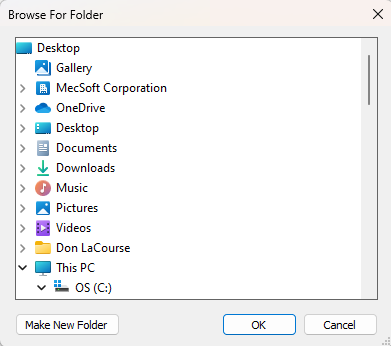
Use this button to copy any posts from the previous version of RhinoCAM or VisualCAM and paste them into the current version so that they appear in the Current Post-Processor list. 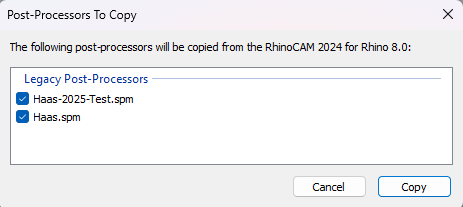 Copy any modified posts from previous version To use this feature: 1.First, you must have posts in your "Folder to load post-processor files from" that are new or have been revised after the previous RhinoCAM or VisualCAM version was installed. 2.Select the Copy any modified posts from previous version button. 3.The Post-Processors To Copy dialog will display listing the post that will be copied. 4.Then pick Copy to accept and close the dialog. 5.When you display the Select Post-processor dialog again, your previous posts will be listed for selection from the Current post-processor list.
|
 NOTE: It is advisable that you rename any modified posts and backup all of your post-processor definition files and keep them in a safe location outside of the plug-in installation path so that you can access them manually if needed.