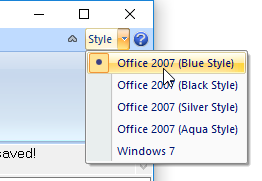
VisualCAD allows you to change the Style of the display. At the very top right of the VisualCAD display window, select the Style drop-down menu and select Office 2007 (Blue Style).
|
|
<< Click to Display Table of Contents >> Navigation: VisualCAD > Exercises > #1: VisualCAD Preferences > Exercise #1: Set the Display Style |
VisualCAD allows you to change the Style of the display. At the very top right of the VisualCAD display window, select the Style drop-down menu and select Office 2007 (Blue Style).
|