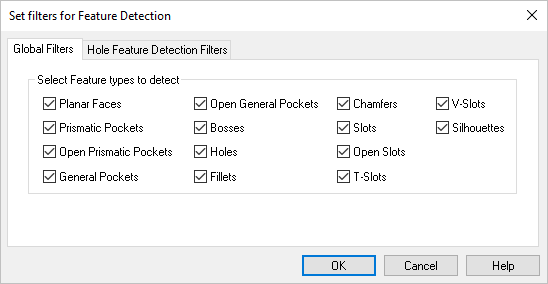
This dialog box allows you to set Detection Filters for use when creating new Feature Machining Operations. You can detect a variety of machining features including Faces, Bosses, Slots, Pockets and Holes. You can also detect Partial Holes and set Diameter Range and Depth Range filters for Hole detection. Refer to each parameter definition below.
Check this box to enable diameter filters when creating new hole features.
Minimum Diameter / Maximum Diameter
Use these fields to set the Minimum and Maximum Diameter values to filter. Only holes within these values will be recognized when creating new hole features.
You can use the Pick button to select hole geometry. The diameter value of the selected hole will added to the dialog.
Check this box to enable depth filters when creating new hole features.
Minimum Depth / Maximum Depth
Use these fields to set the Minimum and Maximum Depth values to filter. Only holes within these values will be recognized when creating new hole features.
You can use the Pick button to select hole geometry. The Z level depth value of the selected hole will added to the dialog.
 This dialog box allows you to set Detection Filters for use when creating new Feature Machining Operations. You can detect a variety of machining features including Faces, Bosses, Slots, Pockets and Holes. You can also detect Partial Holes and set Diameter Range and Depth Range filters for Hole detection. Refer to each parameter definition below.
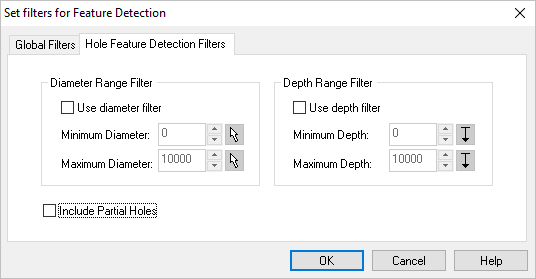
 You can use the Pick button to select hole geometry. The diameter value of the selected hole will added to the dialog.
  You can use the Pick button to select hole geometry. The Z level depth value of the selected hole will added to the dialog.