If you are attempting to activate your MecSoft product license and the License Dialog says that my license is in use on another machine, here are some steps you can take to help resolve the issue:
•Obviously if you are sharing the license on multiple PCs (which is fine) please make sure all other PCs have the license released. This can be done manually from the License dialog (Product Main Menu > License > Release product for use on another Machine).
AUTO RELEASE: If you are running the "Cloud" license model, your license will release automatically after 8 hours.
This is a safeguard. It prevents your license from being inaccessible due to any number of reason such as if the PC crashes or if you cannot get to the PC where the license is currently activated.
•If you are certain that no other PC has your license active, then you can use our license clean up utility. This utility cleans up temporary files related to licensing the product that can sometimes get corrupted if your PC experiences a crash and a recent system update.

In 202x:
|
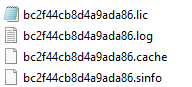
If this error occurs and we can activate it here, go to the users ProgramData folder (C:\ProgramData\MecSoft Corporation) and permanently delete the various data files that are written there and then try activating again. The data file names will all begin with "bc2f44...." as shown below:
Here is a sample diagnostic file: ===================================================== 3/8/2019-17:6:2:904: XML Parameters Used:: 0 |